Linux App
| Light | Dark |
|---|---|
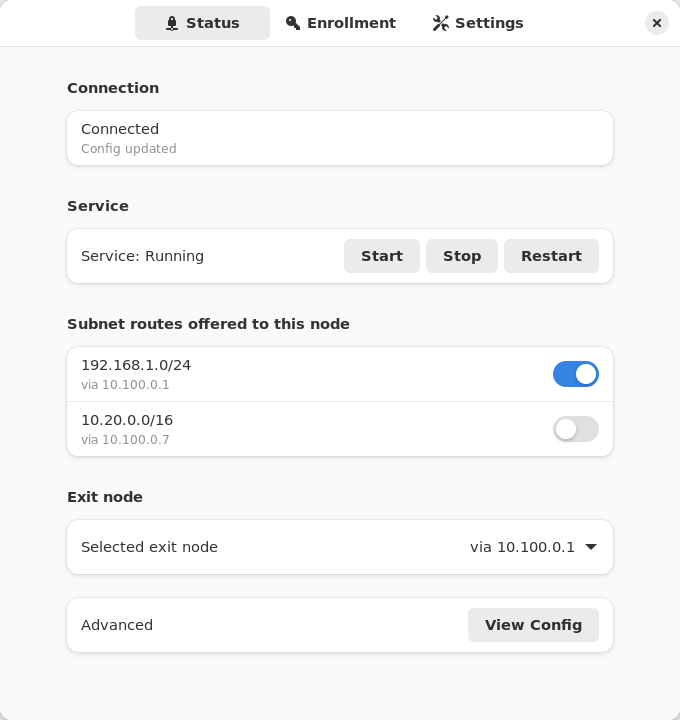 | 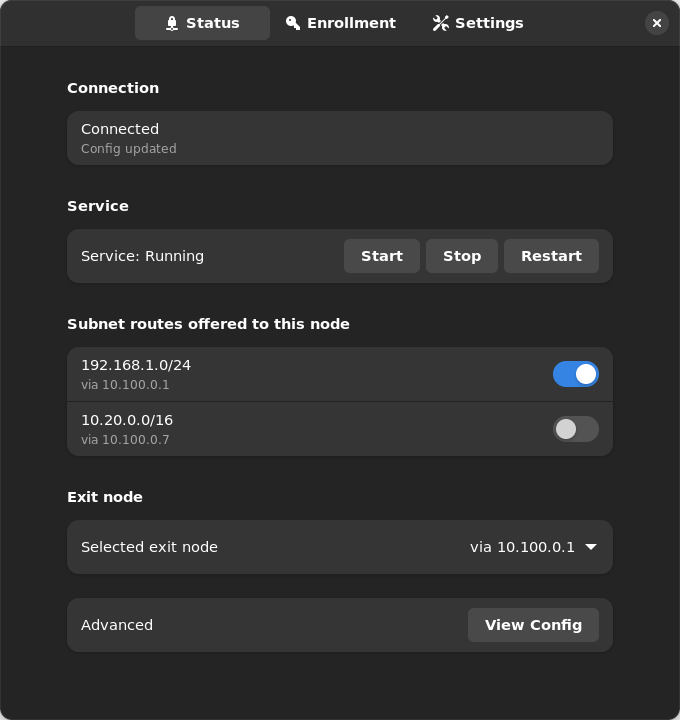 |
On Linux, Nebula Commander (GTK4/libadwaita) is an unelevated desktop app for the background ncclient systemd service. The service does the actual work (polling for config and certs, running Nebula) as root, and exposes a system D-Bus API (org.beardedtek.NebulaCommander1) that the app talks to, authorized per call via polkit.
Anyone can view; administrators change. Any user logged in at the machine can see status and offered routes. Enrolling, changing settings, accepting routes or exit nodes, and starting/stopping the service work without a password for members of the sudo (Debian/Ubuntu) or wheel (Fedora/openSUSE/Arch) group. Anyone else needs an administrator’s password, so other users of a shared machine can’t re-point or stop the tunnel. Remote (SSH) sessions get nothing through the app’s API; use sudo on the command line instead.
The app and service are installed together via .deb, .rpm, or Flatpak. The app isn’t designed to run without the service; if the service isn’t installed or running, the Status tab says so. On a server you can install just nebula-commander-service and manage it from the shell (see Headless use).
Where state lives
The service keeps its token, settings.json, generated Nebula config, and status under /var/lib/ncclient/ (root-only). The app never reads these files directly, only through the D-Bus API (View Config shows the node’s private key as <redacted>). The service uses the distribution’s packaged nebula binary.
Enroll
- Open Nebula Commander from your application launcher.
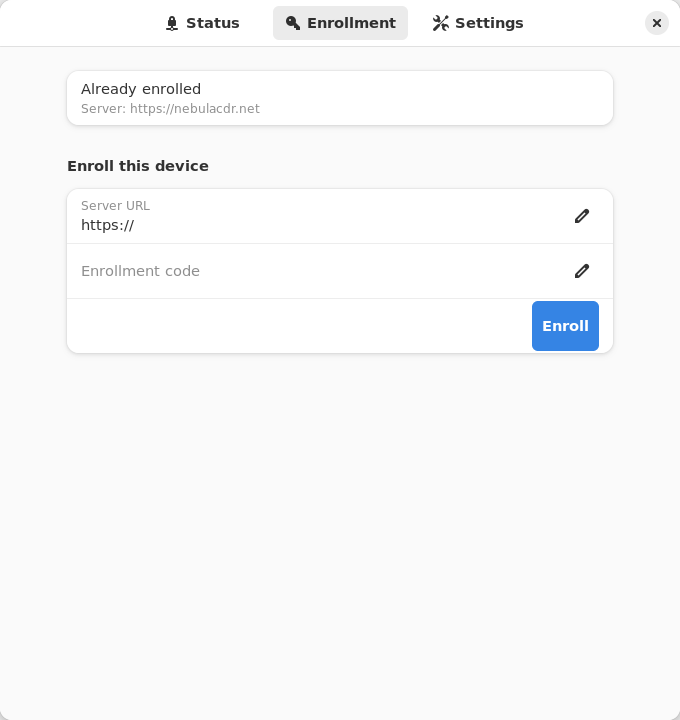
- Go to the Enrollment tab and enter the server URL and the one-time code from Nebula Commander (Nodes → open the node → Enroll).
The service picks up the token right away; it waits for enrollment instead of exiting when it has none.
Using the app
The app has three tabs in its header bar and follows the desktop’s light/dark preference.
- Status: connection state (e.g. Connected – Config updated), the systemd service state with Start/Stop/Restart buttons, a switch for each subnet route offered to this node, an Exit node picker, and View Config (under Advanced) to see the generated
config.yaml. Routes that overlap one you’ve already accepted are shown disabled with the reason. You also get a desktop notification when the connection state changes or a new route is offered. - Enrollment: shows whether the device is enrolled (and to which server), and lets you enroll with a server URL and code.
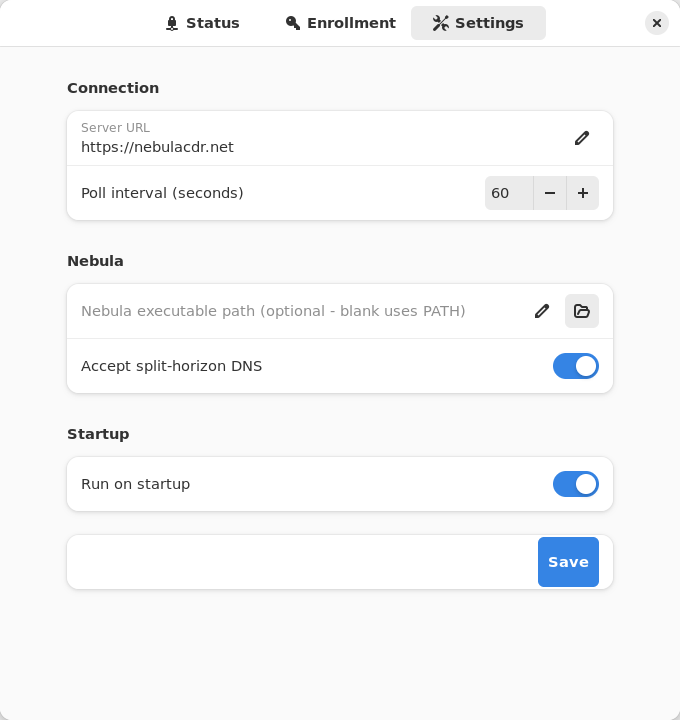
- Settings: server URL, poll interval, Accept split-horizon DNS, and Run on startup (an XDG autostart entry for the app itself). Saving restarts the service automatically so the new values take effect.
| Enrollment | Settings |
|---|---|
 |  |
Subnet routes and exit nodes
Use the switches and the Exit node picker on the Status tab. Changes apply on the service’s next poll. See Subnet routers and exit nodes for how routes are offered.
Split-horizon DNS
Turn on Accept split-horizon DNS in Settings and save. The service restarts with --accept-dns and configures the host’s resolver to match how it manages DNS (systemd-resolved, NetworkManager, dnsmasq, or /etc/resolv.conf). See Split-horizon DNS on the CLI page for details.
Re-enroll
Open the Enrollment tab and enroll again with a new code (and a new server URL, if you’re moving servers). This replaces the device token. The service switches to the new token on its next poll. If you changed the server, click Restart on the Status tab so it polls the new URL.
Headless use (service only)
With only nebula-commander-service installed, manage the service from the shell:
sudo systemctl status ncclient
sudo systemctl restart ncclient
journalctl -u ncclient -f
Run as root, ncclient enroll and ncclient routes automatically use the service’s state in /var/lib/ncclient when the service package is installed.
Enroll or re-enroll:
sudo ncclient enroll --server https://YOUR_NEBULA_COMMANDER_URL --code XXXXXXXX
sudo systemctl enable --now ncclient
On re-enroll the service picks up the new token on its next poll; restart it if you changed servers.
Subnet routes and exit nodes:
sudo ncclient routes list
sudo ncclient routes accept 192.168.1.0/24
reject, accept-exit-node --via <IP>, and reject-exit-node work the same way (see the CLI page).
Split-horizon DNS: the service adds --accept-dns when /var/lib/ncclient/settings.json contains "accept_dns": true. Edit it as root, then sudo systemctl restart ncclient.
Updates
With the package repository configured, the client can upgrade itself during a daily window: Settings → Updates in the app, or sudo ncclient auto-update enable. See Automatic updates.
Troubleshooting
- Status says the service isn’t installed or is unreachable: install
nebula-commander-serviceand start it withsudo systemctl enable --now ncclient. The Flatpak app can’t do this for you. Revoked, deleted, or re-enrolled elsewhere - Nebula stopped. Enroll again to reconnect.in the journal: the device was revoked, deleted, or re-enrolled elsewhere; Nebula was stopped and its config and key removed. Re-enroll it with a new code.- “Administrator required” in the app: your account isn’t in the
sudoorwheelgroup. Ask an administrator to add you (sudo usermod -aG sudo USERon Debian/Ubuntu,wheelelsewhere, then log out and back in), or have them make the change. - Enrolled with
sudo ncclient enrollbut the service still waits for enrollment (versions before 0.6.9): the token went to root’s home directory instead of/var/lib/ncclient. Upgrade, or prefix the command withNEBULA_COMMANDER_CONFIG_DIR=/var/lib/ncclient NEBULA_DEVICE_TOKEN_FILE=/var/lib/ncclient/token.
Run from source
From the nebula-commander repo root, with PyGObject, GTK 4, libadwaita, and jeepney installed (on Debian/Ubuntu: python3-gi gir1.2-gtk-4.0 gir1.2-adw-1 python3-jeepney):
python3 -m client.linux.desktop
It still needs a running ncclient.service that exposes the D-Bus API (from nebula-commander-service or the NixOS module). Without one, Status shows the service as not installed.
Build
See Linux Desktop App installation and Development: Manual builds for building the .deb/.rpm/Flatpak packages yourself.